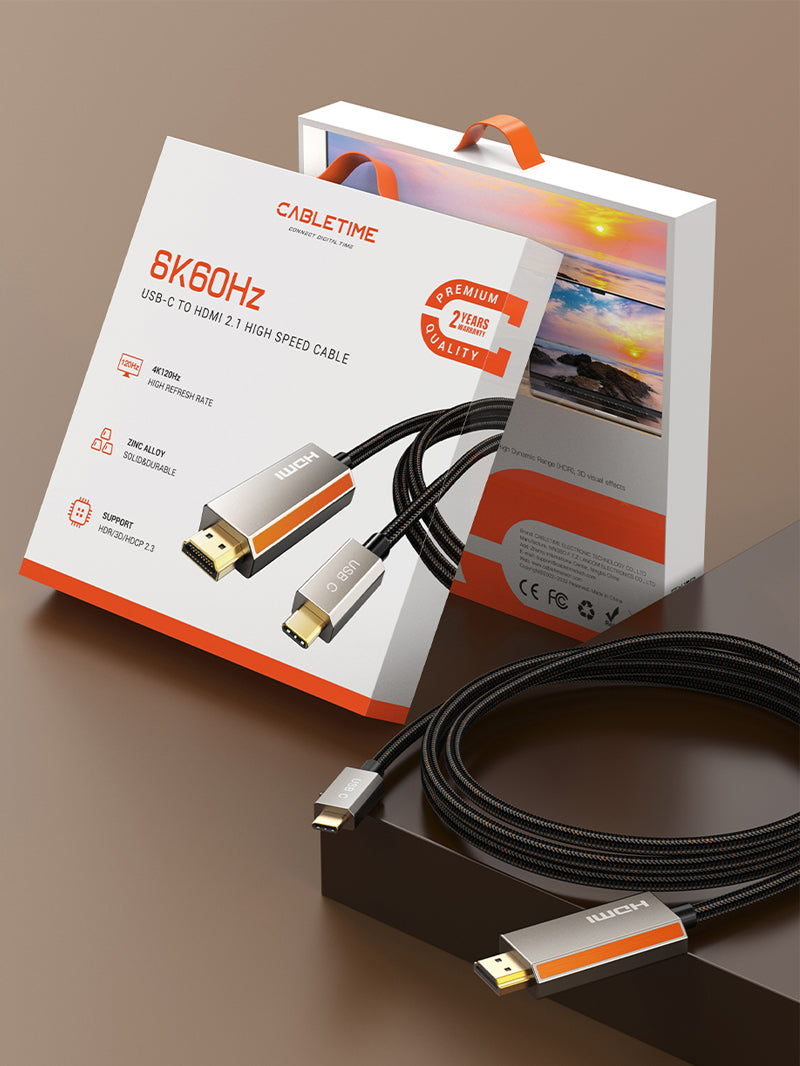
Zinc Alloy USB C Male to HDMI Male 8K Cable Cord 4K 120Hz for MacBook Pro
Connect your USB-C laptop, MacBook, tablet or supported smartphone directly to an HDMI monitor, TV or projector with stunning 8K@60Hz display output, high-refresh 4K support, Dynamic HDR 10+ and a durable black-gold braided design.
8K Clarity. Premium Build.
Built for MacBook Pro, MacBook Air, USB-C laptops, tablets, HDMI TVs, monitors, projectors, gaming setups and premium workstations.
Maximum ResolutionHigh-Refresh SupportVMM7100Advanced Chipset1m / 2m / 3mLength Options
Direct USB-C to HDMI Display Connection
The CABLETIME Zinc Alloy USB C Male to HDMI Male 8K Cable is designed for users who want a premium single-cable connection from USB-C devices to HDMI displays. It is ideal for connecting MacBook Pro, MacBook Air, USB-C laptops, tablets and supported smartphones to monitors, TVs and projectors for work, gaming, streaming, meetings and home theatre use.
Simple Connection Flow
One premium cable from USB-C source to HDMI display.
USB-C Source Device
MacBook Pro, MacBook Air, USB-C laptop, tablet or supported smartphone with video output.
CABLETIME 8K HDMI Cable
USB-C male to HDMI male cable with VMM7100 chipset and zinc alloy shell.
HDMI Display
8K TV, HDMI monitor, projector, gaming screen or conference display.
8K@60Hz Visual Output
Supports up to 8K@60Hz output on compatible USB-C source devices and HDMI displays for ultra-clear big-screen viewing.
4K High-Refresh Display
Designed for smooth 4K high-refresh setups, gaming monitors and HDMI displays where the complete hardware chain supports it.
Dynamic HDR 10+
Dynamic HDR 10+ support helps enhance contrast, brightness and color depth on compatible content and display setups.
Advanced VMM7100 Chipset
Built-in VMM7100 chipset helps maintain smooth and stable video performance for high-resolution HDMI output.

Why Choose CABLETIME CC15 Zinc Alloy USB-C to HDMI 8K Cable?
The CABLETIME Zinc Alloy USB C Male to HDMI Male 8K Cable Cord 4K 120Hz for MacBook Pro is designed for users who want a premium USB-C to HDMI display cable with stronger construction, high-resolution output and a distinctive black-gold braided finish.
It is useful for MacBook Pro, MacBook Air, USB-C laptops, iPad Pro / Air, Samsung Tab S Series, compatible USB-C smartphones, HDMI monitors, 8K TVs, projectors, gaming displays and home theatre setups.
With 8K@60Hz, 4K high-refresh support, Dynamic HDR 10+, VMM7100 chipset, mirror and extended modes, zinc alloy shell, black braided jacket and unique orange stripe design, it is a strong choice for premium display performance and durable everyday use.
Premium Zinc Alloy Design with Signature Orange Detail
Inspired by Cabletime’s global product design, this cable combines high-performance USB-C to HDMI display output with a strong zinc alloy housing, durable black braided jacket and unique orange stripe on the HDMI shell. It is designed to look premium while handling daily work, entertainment and gaming use.
Gaming & High Refresh
Use compatible USB-C laptops with HDMI gaming monitors or TVs for smooth 4K high-refresh display output.
Home Theatre Ready
Connect your USB-C device to a large HDMI TV or projector for movies, sports, streaming and entertainment.
Professional Workstation
Extend your MacBook or USB-C laptop to an HDMI monitor for design, spreadsheets, coding, dashboards and meetings.

Mirror Mode & Extended Mode
Use the display mode that fits your work, entertainment or presentation setup.
Mirror Mode
Show the same screen on your HDMI TV, monitor or projector for meetings, training, teaching, movies and demos.
Extended Mode
Add a second screen for multitasking, editing, coding, browsing, research, design and professional workflows.
High-Resolution HDMI Display Performance
Enjoy sharp visuals, smooth motion and enhanced HDR display output where the connected USB-C device, HDMI display and content support the required standards.
8K@60Hz
For compatible 8K HDMI displays and USB-C source devices with video output support.
4K High Refresh
Suitable for smoother gaming, fast visuals and compatible HDMI high-refresh displays.
Dynamic HDR 10+
Helps improve color, brightness and contrast where the full display setup supports HDR.

Available Length Options
Choose the cable length based on your desk, monitor, TV or projector setup.
CC15H
Compact option for close laptop-to-monitor or desk setups.
CC15L
Balanced length for most office, home and gaming display setups.
CC15N
Longer reach for TVs, projectors, presentation rooms and wider workstations.
Compatible Display Setups
Designed for USB-C source devices that support video output and HDMI display devices.
MacBook ProMacBook AirUSB-C LaptopiPad Pro / AirUSB-C PhoneHDMI TVMonitorProjector
Best Used For
MacBook Pro to HDMI Display
Connect MacBook Pro or MacBook Air to HDMI monitors, TVs or projectors for premium display output.
Gaming & High-Refresh Use
Use compatible USB-C laptops with HDMI gaming monitors or TVs for smooth high-refresh visual output.
Home Theatre & Streaming
Stream movies, shows, sports and videos from a USB-C device to a big HDMI TV or projector.
Office & Presentations
Extend or mirror your laptop screen for meetings, training rooms, classrooms and conference displays.
Simple Plug-and-Use Setup
Connect your USB-C device to an HDMI display without a separate adapter.
Plug USB-C Side
Connect the USB-C male connector to a compatible MacBook, laptop, tablet or phone with video output support.
Connect HDMI Side
Plug the HDMI male connector into your HDMI monitor, TV, projector or display input.
Mirror or Extend
Choose mirror mode or extended mode from your device display settings, where supported.
Important Compatibility Note
This is a USB-C to HDMI cable. It is intended for USB-C source device to HDMI display output only.
It is not bidirectional and cannot convert HDMI output from a laptop, console, set-top box or media device into USB-C display input.
Your USB-C source device must support DisplayPort Alt Mode, Thunderbolt video output or USB-C video output for the HDMI display to work.
8K@60Hz or 4K high-refresh output requires compatible source hardware, graphics capability, HDMI display input, display settings and monitor / TV support.
Product marketing mentions 4K@120Hz while the specification table lists 4K@144Hz. Actual output depends on the connected device and display capability.
This cable is for audio/video display output only. It does not provide USB data transfer, laptop charging, Ethernet or touchscreen return function.
Product Specifications
| Specification | Details |
|---|---|
| Brand | CABLETIME |
| Product Name | Zinc Alloy USB C Male to HDMI Male 8K Cable Cord 4K 120Hz for MacBook Pro |
| Models | CC15H, CC15L, CC15N |
| Length Options | 1m, 2m, 3m |
| Input | USB-C Male, Gold-Plated |
| Connector B | HDMI Male, Gold-Plated |
| Chipset | VMM7100 |
| Resolution | 8K@60Hz Max, 4K@144Hz listed in specifications; feature copy mentions 4K@120Hz |
| HDR Support | Dynamic HDR 10+ support with compatible source, display and content |
| Display Modes | Mirror Mode, Extended Mode |
| Material | Zinc Alloy + Black Braided with Gold Jacket |
| Design Feature | Unique Orange Stripe on HDMI shell |
| SKU | CT-CMHD8K-ZG1, CT-CMHD8K-ZG2, CT-CMHD8K-ZG3 |
Buy from CABLETIME Official Store India
Get genuine CABLETIME products in India with secure checkout, official product availability and customer support.
Genuine ProductOfficial India Store8K@60Hz OutputCustomer SupportFrequently Asked Questions
What is this cable used for?
It is used to connect a compatible USB-C device to an HDMI monitor, TV or projector for audio/video display output.
What are the connectors?
It has a USB-C Male connector on one side and an HDMI Male connector on the other side, both gold-plated.
What resolution does it support?
The specification table lists 8K@60Hz Max and 4K@144Hz. The product title and feature copy also mention 4K@120Hz. Actual output depends on the source device and display.
Does it support HDR?
Yes, it supports Dynamic HDR 10+ where the source device, display and content support HDR.
Is this cable bidirectional?
No. It is intended for USB-C source device to HDMI display output only. It does not convert HDMI output into USB-C display input.
Does my USB-C device need video output support?
Yes. Your USB-C device must support DisplayPort Alt Mode, Thunderbolt video output or USB-C video output for HDMI display to work.
Does this cable charge my laptop or transfer USB data?
No. This is an audio/video display cable. It does not provide laptop charging, USB data transfer, Ethernet or touchscreen return function.
Available options
| Option | SKU |
|---|---|
| 1m | CC15H |
| 2m | CC15L |
| 3m | CC15N |
Choose your option using the product selector above. Availability is shown for the selected option.
Check the signal path first.
Identify the source and display or capture device, check connector type and conversion direction, then connect and select the correct input. Choose a video mode supported by the complete setup.
Will I always get the maximum listed resolution?
Actual output depends on the source, receiving device, intermediate equipment, selected mode and the length or version you choose. Check any length-specific limits in the product details.
Which length or version should I select?
Use the product selector to choose the required option. Check that option against any model, connector, length or pack-size distinctions in the specifications before ordering.