USB-C to DisplayPort 1.4 Cable, 8K@60Hz / 4K@144Hz, 2m
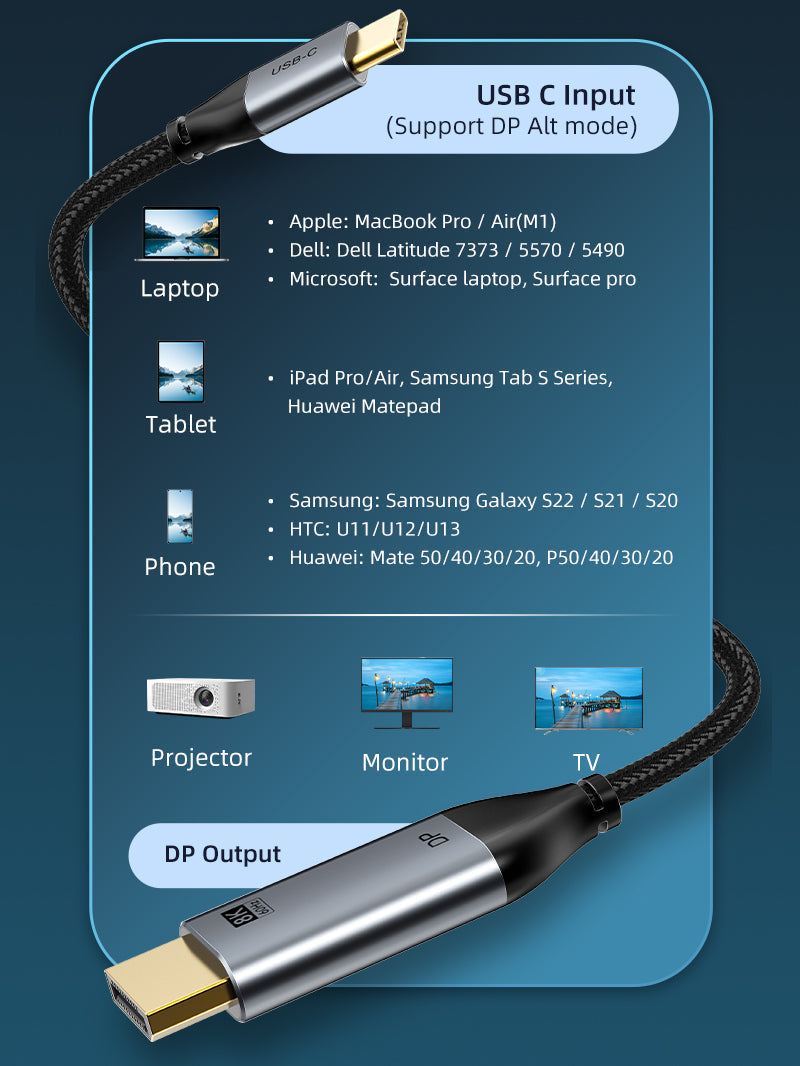
Connect a compatible USB-C or Thunderbolt computer directly to a full-size DisplayPort monitor. The CABLETIME CC21L supports high-resolution and high-refresh display modes up to 8K@60Hz or 4K@144Hz when the complete system supports them.
Designed for your setup
CABLETIME INDIA • CC21L • USB-C SOURCE TO DISPLAYPORT DISPLAY

Direct 2-metre USB-C to DisplayPort 1.4 display connection
8K@60HzMaximum listed resolution.
4K@144HzFor compatible high-refresh displays.
DisplayPort 1.4One-way digital video connection.
2 MetresCC21L / CT-CMDP8K-AG2 only.
Connection direction and host requirement
Direction: USB-C source device → DisplayPort monitor or display. The USB-C port must support DisplayPort Alt Mode, Thunderbolt video output or another explicitly compatible display-output mode.
USB-C shape is not enough:charging-only and data-only USB-C ports cannot send video through this cable. This listing is for the selectable 2m CC21L variant only; it does not include a 3m option.

Technical specifications
| Brand | CABLETIME |
|---|---|
| Model / SKU | CC21L / CT-CMDP8K-AG2 |
| Length | 2m |
| Input connector | USB-C male, gold-plated |
| Output connector | DisplayPort male, gold-plated |
| Maximum listed display modes | Up to 8K@60Hz / 4K@144Hz with compatible hardware |
| Direction | Unidirectional: USB-C source to DisplayPort display |
| Construction | Aluminium-alloy connector shells and black braided jacket |
USE
Ideal for high-resolution office monitors, content-creation displays, gaming monitors, presentations and workstation setups.
COMPATIBILITY
Confirm that the USB-C host supports video output. Maximum resolution and refresh rate depend on the host GPU, USB-C port, operating system and display.
FAQ
Does it charge the laptop? No charging function is claimed for this display cable.
Can I reverse it? No. Use is USB-C source to DisplayPort display.
Is a 3m version included in this listing? No. The available variant is 2m, SKU CT-CMDP8K-AG2.
Genuine CABLETIME product • GST invoice • India-based assistance • Applicable warranty support • Exact CC21L and SKU identification


Check the signal path first.
Identify the source and display or capture device, check connector type and conversion direction, then connect and select the correct input. Choose a video mode supported by the complete setup.
Will I always get the maximum listed resolution?
Actual output depends on the source, receiving device, intermediate equipment, selected mode and the length or version you choose. Check any length-specific limits in the product details.
Which length or version should I select?
Use the product selector to choose the required option. Check that option against any model, connector, length or pack-size distinctions in the specifications before ordering.