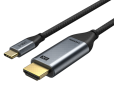

USB-C to HDMI Cable, 4K@30Hz, 1m–3m
A single-cable route from a USB-C or Thunderbolt source to an HDMI monitor, television or projector, supporting up to 4K@30Hz with compatible equipment.
Turn one video-capable USB-C port into a direct HDMI display connection


A clean alternative to a separate dongle and HDMI cable
The converter electronics are integrated into the cable, making it easier to carry and simpler to install at a desk, meeting room or home display.
Its braided exterior and multiple length options suit both travel kits and permanent display installations—provided the USB-C port can output video.
Check before ordering:USB-C describes the connector, not its capabilities. Verify DP Alt Mode or Thunderbolt video support on the source device.
Exact technical specification
| Input | USB-C male, gold-plated |
|---|---|
| Output | HDMI male, HDMI 1.4, gold-plated |
| Maximum video | Up to 3840×2160 at 30Hz with compatible hardware |
| Transmission rate | Up to 10.2Gbps |
| Construction | Aluminium-alloy/PVC shell, black braided jacket, 4.2mm OD |
| Models / SKUs | CC12H 1m; CC12K 1.8m; CC12N 3m |
USE — step-by-step setup
- Confirm the USB-C port supports DisplayPort Alternate Mode or Thunderbolt video.
- Connect USB-C to the laptop, tablet or compatible phone.
- Connect HDMI to the monitor, TV or projector.
- Select the HDMI input and set the desired display mode in the operating system.
COMPATIBILITY — what it works with
The source USB-C port must support wired video output. A charging-only USB-C port will not produce a picture.
- Works with many DP Alt Mode USB-C and Thunderbolt laptops, tablets and selected phones.
- The display must have an HDMI input.
- Maximum resolution is limited by the source, cable and display.
- The cable is not designed for HDMI-source to USB-C-display conversion.
USER SCENARIOS — practical applications
- Portable presentation: Connect a compatible laptop directly to an HDMI projector.
- Home viewing: Send video from a USB-C device to a television.
- Second screen: Extend a laptop desktop to an HDMI monitor.
- Travel kit: Avoid carrying a separate adapter and HDMI cable.
FAQ — practical answers
Is it bidirectional?
No. It works from USB-C source to HDMI display.
Does it charge the laptop?
No charging function is specified for this video cable.
Will every phone work?
Only phones that support wired display output through USB-C.
Can it do 4K at 60Hz?
This family is specified up to 4K at 30Hz.
Genuine product identification, GST invoice, India support and the applicable product warranty. Match the exact SKU and connector direction before ordering.


Available options
| Option | SKU |
|---|---|
| 1m | CC12H |
| 1.8m | CC12K |
| 3m | CC12N |
Choose your option using the product selector above. Availability is shown for the selected option.
Check the signal path first.
Identify the source and display or capture device, check connector type and conversion direction, then connect and select the correct input. Choose a video mode supported by the complete setup.
Will I always get the maximum listed resolution?
Actual output depends on the source, receiving device, intermediate equipment, selected mode and the length or version you choose. Check any length-specific limits in the product details.
Which length or version should I select?
Use the product selector to choose the required option. Check that option against any model, connector, length or pack-size distinctions in the specifications before ordering.