4-in-1 4K@60Hz HDMI Auto Presentation Switcher, USB-C / HDMI / DP / Mini DP to HDMI
Connect four different presentation sources to one HDMI display without constantly changing cables. This CABLETIME 4-in-1 auto presentation switcher supports USB-C, HDMI, DisplayPort and Mini DisplayPort inputs, delivering 4K@60Hz HDMI output with automatic input detection, one-button manual switching, LED indicators, HDCP 2.2, HDR10, 3D and 7.1-channel audio support.
Designed for your setup
CABLETIME CB00G | 4-in-1 Auto Presentation Switcher | SKU CT-PS41-GB1
USB-C + HDMI + DP + Mini DP4K@60Hz HDMI OutputAuto Input DetectionHDCP 2.2 + HDR10
Four Inputs, One HDMI Display
Perfect for meeting rooms, classrooms, podiums and shared presentation tables.
4-in-1Multi-Input Switcher4K60HDMI Output15mLong-Distance SupportCB00GModel NumberProfessional Auto Presentation Switcher for Meeting Rooms & Classrooms
The CABLETIME 4-in-1 4K@60Hz HDMI Auto Presentation Switcher is designed for modern spaces where different users bring different devices. Instead of keeping separate adapters for USB-C, HDMI, DisplayPort and Mini DisplayPort laptops, this switcher combines all four inputs into one HDMI output. It is ideal for conference rooms, classrooms, lecture halls, training rooms, boardrooms, shared desks, AV racks and collaborative workspaces.

How It Works
Connect multiple source devices to the switcher, then send the active source to one HDMI display or projector.
1. Connect Source Devices
Connect laptops, tablets or workstations through USB-C, HDMI, DisplayPort or Mini DisplayPort input.
2. Auto or Manual Switching
The switcher automatically detects the active input, or users can switch manually using the physical button.
3. Output to HDMI Display
Send the selected input to one HDMI TV, projector, monitor, LED wall processor or AV receiver.
Important Switcher vs Splitter Note
This is a multi-input HDMI presentation switcher. It is used to connect multiple source devices to one HDMI display. It is not an HDMI splitter and does not send one source to multiple screens.
USB-C input requires a source device that supports video output over USB-C, such as USB-C DisplayPort Alt Mode, Thunderbolt or compatible video-enabled USB-C output.
4⃣ 1⃣Four Inputs to One Display
Best for presenter switching, meeting rooms and shared display systems.

Presentation Switching Workflow
A clean AV setup for spaces where multiple people need to present to the same screen.
USB-C Input
For compatible USB-C laptops, tablets and devices with video output support.
HDMI Input
For laptops, PCs, media players, cameras, consoles and standard HDMI sources.
DP + Mini DP Input
For DisplayPort and Mini DisplayPort computers, workstations and older presentation devices.
HDMI Output
Connect to one HDMI monitor, TV, projector, LED wall processor or AV receiver.
Made for Meeting Rooms, Classrooms & Shared Workspaces
A practical solution for spaces where multiple device types need to present to the same display.
Conference Rooms
Let multiple participants connect through USB-C, HDMI, DisplayPort or Mini DP and present on one central screen.
Classrooms & Lecture Halls
Connect teacher laptops, student devices or AV source systems to a classroom projector without changing adapters.
Podiums & Training Rooms
Keep all common video inputs ready at a podium or trainer desk for faster presenter changeover.
Collaborative Workspaces
Support mixed-device teams using Windows laptops, MacBooks, tablets and workstations in one shared display setup.

Key Features
Built for reliable 4K presentation switching, broad device compatibility and easy control in professional spaces.
True 4-in-1 Input Design
Supports USB-C, HDMI, DisplayPort and Mini DisplayPort inputs, reducing the need for separate adapters in shared AV setups.
4K@60Hz HDMI Output
Delivers Ultra HD 4K@60Hz output with sharp text, smooth motion and clean image clarity on compatible displays.
Auto Input Detection
Automatically detects the latest active source and switches to it, reducing interruptions during meetings and classes.
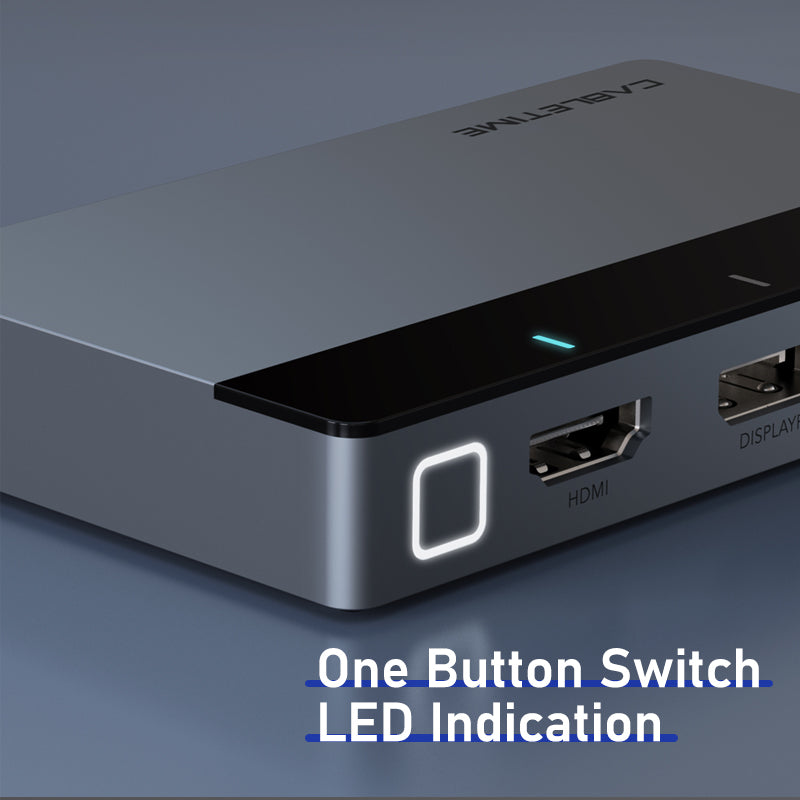
One-Button Manual Switching
A physical switch button allows presenters to manually select the required input whenever needed.
LED Input Indicators
Clear LED lights show which input source is active, making operation easy even for non-technical users.
Premium Compact Housing
Aluminum, ABS and acrylic construction gives the switcher a durable and professional look for desks, AV racks and podiums.
High-Quality AV Performance
Built to keep presentations, videos and professional display output clean, stable and secure.
4:4:4 Chroma
Helps maintain sharp text and accurate colour for spreadsheets, dashboards, documents and presentations.
HDR10 + 3D Support
Supports richer video formats where the source, content and display chain are compatible.
HDCP 2.2 Support
Helps support secure playback and protected HDMI content in compatible AV environments.
7.1-Channel Audio
Supports multi-channel audio pass-through for richer presentation, video and entertainment setups.

Compatible Source Types & Systems
Ideal for mixed-device environments where different users bring different video output ports.
USB-C VideoHDMIDisplayPortMini DPmacOSiPadOSWindowsAndroidWhat This Product Does
- Connects four different video input types to one HDMI display output.
- Supports USB-C, HDMI, DisplayPort and Mini DisplayPort source inputs.
- Outputs HDMI video up to 4K@60Hz.
- Supports 4:4:4 chroma sampling for sharp text and clear presentation visuals.
- Automatically detects and switches to the latest active input source.
- Includes a manual switch button for quick presenter control.
- LED indicators show the active input channel.
- Supports HDCP 2.2, HDR10, 3D and 7.1-channel audio in compatible setups.
- Supports stable long-distance HDMI transmission up to 15m as listed on the product page.
- Compact 98 × 58 × 15.5mm body and 86g weight make it easy to place on desks, podiums and AV racks.
Please Check Before Buying
- This is a presentation switcher, not an HDMI splitter.
- It sends one selected input source to one HDMI output display.
- It does not send one source to multiple HDMI displays.
- USB-C input requires a USB-C source device that supports video output.
- 4K@60Hz requires source device, cable and display support for 4K60 output.
- For HDR10, 3D, 7.1 audio and HDCP 2.2, the complete source-to-display chain must support the required standard.
- Type-C 5V/2A power is required as listed in the specification.
- Automatic switching depends on active signal detection; manual button control can be used when needed.
Specification Sheet
Complete technical details for model, SKU, inputs, output, resolution, supported standards, power, size and material.
| Specification | Details |
|---|---|
| Brand | CABLETIME |
| Product Name | 4-IN-1 Multi Port to HDMI Auto Presentation Switcher |
| Model | CB00G |
| SKU | CT-PS41-GB1 |
| Product Type | 4-in-1 multi-input to HDMI auto presentation switcher |
| Input Ports | USB-C, HDMI, DisplayPort, Mini DisplayPort |
| Output Port | HDMI |
| Maximum Output Resolution | HDMI 4K@60Hz |
| Input Resolution Support | Type-C, Mini DP, DP and HDMI inputs up to 4K@60Hz as listed by CABLETIME |
| Video Support | 4K@60Hz, 4:4:4 chroma, HDR10 and 3D in compatible setups |
| HDCP Support | HDCP 2.2 |
| Audio Support | 7.1-channel audio in compatible setups |
| Switching Method | Automatic input detection plus manual switch button |
| Indicators | LED indication light |
| Power | Type-C 5V / 2A |
| Transmission Distance | Up to 15m stable long-distance transmission as positioned on the product page |
| Material | Aluminum + ABS + Acrylic |
| Size | 98 × 58 × 15.5mm |
| Weight | 86g |
| Colour | Space Grey + Black |
| System Support | macOS, iPadOS, Windows and Android as listed by CABLETIME |
| Warranty | 2-year warranty as listed by CABLETIME |
| Primary Use | Switching between USB-C, HDMI, DP and Mini DP source devices to one HDMI display for meetings, classrooms, podiums and shared AV spaces |
Frequently Asked Questions
Clear answers help customers understand switching, compatibility, USB-C video support and correct installation.
What is this product used for?
It is used to connect multiple source devices with USB-C, HDMI, DisplayPort or Mini DisplayPort outputs to one HDMI display, projector or TV.
Is this an HDMI splitter?
No. This is a presentation switcher. It selects one input source and outputs it to one HDMI display. It does not send one source to multiple displays.
What input ports does it support?
It supports USB-C, HDMI, DisplayPort and Mini DisplayPort inputs.
What output port does it have?
It has one HDMI output for connecting to a TV, monitor, projector, LED processor or AV receiver.
Does the USB-C input work with all USB-C devices?
No. The USB-C source device must support video output over USB-C, such as USB-C DisplayPort Alt Mode, Thunderbolt or compatible video-enabled USB-C output.
What is the maximum resolution?
It supports HDMI output up to 4K@60Hz when the source, cable and display all support 4K60Hz.
Does it switch automatically?
Yes. It supports automatic input detection and can switch to the latest active source. It also has a manual switch button for direct control.
What are the LED indicators for?
The LED indicators show which input source is currently active, making it easier to manage multiple presenters.
Does it support HDR and HDCP?
Yes, it supports HDR10 and HDCP 2.2 in compatible setups. The source, content, cable and display must also support these standards.
Does it support audio?
Yes, it supports up to 7.1-channel audio pass-through where the source device, display or AV receiver supports it.
Does it need external power?
Yes, the specification lists Type-C 5V / 2A power. Connect the required power source for stable operation.
Where is this switcher most useful?
It is most useful in meeting rooms, classrooms, training rooms, lecture halls, boardrooms, shared workspaces, podiums and AV installations where different users bring different devices.
Buy from CABLETIME Official Store India
Choose genuine CABLETIME products in India with secure checkout, official availability and local customer support.
Official India StoreGenuine Product4-in-1 Switching4K60 Presentation ReadyCheck the signal path first.
Identify the source and display or capture device, check connector type and conversion direction, then connect and select the correct input. Choose a video mode supported by the complete setup.
Will I always get the maximum listed resolution?
Actual output depends on the source, receiving device, intermediate equipment, selected mode and the length or version you choose. Check any length-specific limits in the product details.
Which length or version should I select?
Use the product selector to choose the required option. Check that option against any model, connector, length or pack-size distinctions in the specifications before ordering.