USB4 USB C OTG Adapter 240W 40Gbps 8K
A compact USB4 USB-C male to USB-C female angle adapter designed to redirect your cable, reduce port strain, support fast charging, high-speed data transfer and 8K display output on compatible devices.
Designed for your setup
CABLETIME USB4 | USB-C Male to USB-C Female OTG Angle Adapter
240W PD40Gbps8K@60HzUSB4
Redirect. Protect. Perform.
Ideal for MacBook, laptops, tablets, phones, handheld consoles, chargers, docks and tight USB-C setups.
240WPD Charging SupportUSB4 Data TransferVideo Output Support4 ShapesL / U Angle OptionsUSB-C Angle Adapter for Tight Spaces, Cleaner Setups & Safer Ports
The CABLETIME USB4 USB C OTG Adapter is designed for users who want to connect USB-C cables in a cleaner and safer direction. Whether your laptop is close to a wall, your gaming handheld is docked, your tablet is on a stand, or your charger cable bends awkwardly, this compact adapter helps redirect the cable while maintaining premium USB-C performance.

Simple Connection Flow
Add an angle between your USB-C device and USB-C cable without changing the cable type.
USB-C Device
Laptop, MacBook, tablet, phone, gaming handheld, dock or monitor.
CABLETIME Adapter
USB-C male to USB-C female adapter with L-shape, U-shape and angle options.
USB-C Cable
Charging cable, data cable, USB4 cable, display cable or dock connection.
240W Fast Charging
Supports up to 240W charging for compatible USB-C chargers, cables and devices using high-power USB-C power delivery.
40Gbps Ultra-Fast Data
Supports up to 40Gbps transfer on compatible USB4 / Thunderbolt / high-speed USB-C devices and cables.
8K@60Hz Video Output
Supports 8K@60Hz video output where the connected USB-C device, cable, display and video mode are compatible.
Port Protection Design
Angle shape helps reduce bending stress on cables and USB-C ports in tight desk, gaming and charging setups.
Why Choose CABLETIME USB4 USB-C OTG Adapter?
The CABLETIME USB4 USB C OTG Adapter 240W 40Gbps 8K is built for modern USB-C setups where cable angle, desk space and port protection matter.
It is useful for MacBooks, USB-C laptops, tablets, smartphones, gaming handhelds, USB-C chargers, docks, monitors, external storage and desk setups with limited space.
With 240W charging support, 40Gbps transfer rate, 8K@60Hz video support, USB-C male to USB-C female design, and multiple angle-shape options, it is a premium USB-C port-saver for professional, gaming, travel and home office use.

Designed for Cleaner Cable Routing & Long-Term Port Protection
Inspired by Cabletime’s global product positioning, this USB4 adapter is made for tight spaces and everyday use. Its L-shape, U-shape and right-angle designs help adjust the cable direction, reduce bending pressure and keep your setup cleaner.
Desk Setup Friendly
Redirect the cable on laptops, docking stations and monitors to keep your desk cleaner and more organized.
Gaming Handheld Ready
Useful for USB-C gaming handhelds and consoles where straight cables can interfere with grip or placement.
Portable Port Saver
Small and easy to carry in a laptop sleeve, charger pouch, camera bag or travel tech kit.
Choose the Right Shape for Your Setup
Select the angle style based on your device position, desk layout and cable direction.
Side L Shape
Helps route the cable sideways from the USB-C port for cleaner desk or laptop use.
Center L Shape
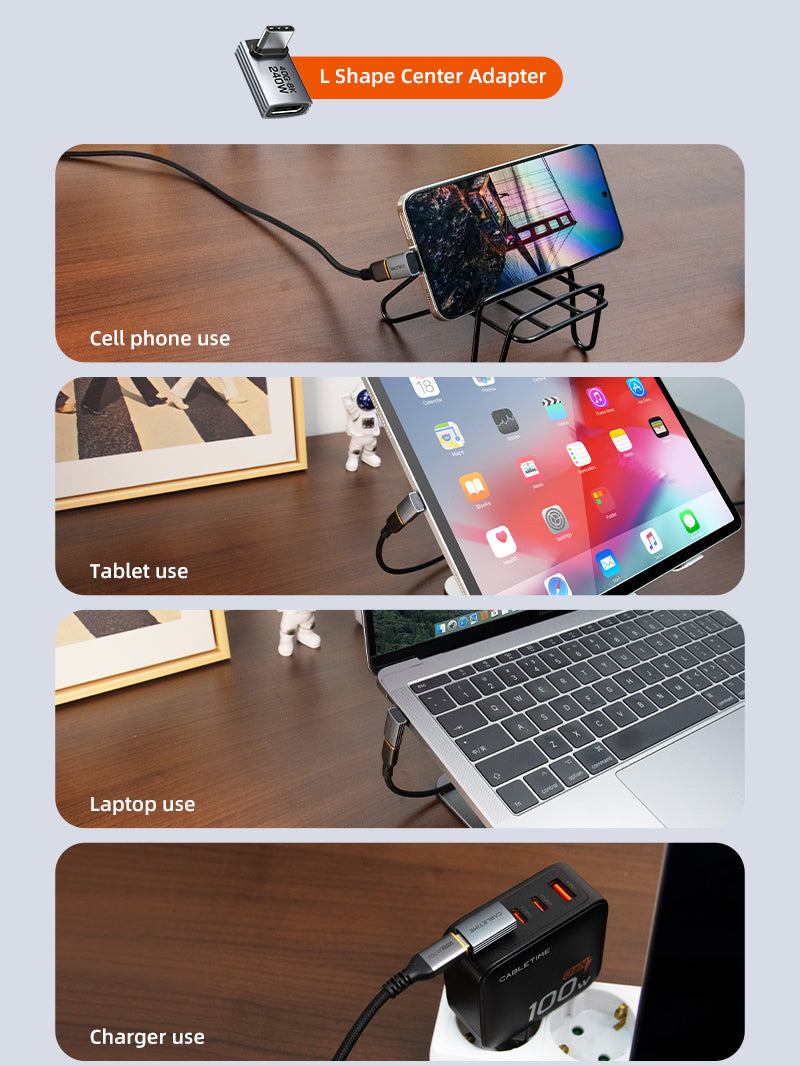
Useful when you need a compact right-angle connection from the center line of the port.
U Shape
Redirects the cable back toward the device, ideal for some compact setups and handheld devices.
Long U Shape
Gives extra reach and redirection where a standard U shape may feel too close to the port.

One Adapter for Charging, Data & Display
When used with compatible USB-C devices, cables and accessories, this USB4 adapter helps maintain high-end USB-C functions in a more convenient angle.
Charging
Supports up to 240W / 48V 5A with compatible USB-C PD equipment.
Data
Supports up to 40Gbps data transfer with compatible USB4 / Thunderbolt devices.
Display
Supports up to 8K@60Hz video when the full display chain supports it.
Wide USB-C Setup Compatibility
Designed for USB-C devices and accessories where port direction and cable angle matter.
MacBookUSB-C LaptopTabletPhoneGame ConsoleUSB-C ChargerUSB-C DockMonitor
Best Used For
Tight Laptop Ports
Route charging or docking cables away from the hand area, wall side or desk edge.
Gaming Handhelds
Redirect the USB-C cable for a cleaner grip while charging, docking or connecting accessories.
Docking Stations
Improve cable direction between laptops, docks, monitors, chargers and USB-C accessories.
Travel & Everyday Carry
A small adapter for laptop bags, charger pouches, office drawers and tech travel kits.
Simple Plug-and-Use Setup
Redirect your USB-C cable without changing your charging, data or display setup.
Plug into USB-C Device
Insert the USB-C male side into your compatible laptop, tablet, phone, dock, charger or monitor.
Connect USB-C Cable
Attach your USB-C cable to the USB-C female side of the adapter.
Charge, Transfer or Display
Use charging, data transfer or video output if your complete USB-C setup supports the required standards.
Important Compatibility Note
This is a USB-C Male to USB-C Female angle adapter. It does not convert USB-C to USB-A, HDMI, VGA, DisplayPort, Ethernet or any different connector type.
240W charging requires a compatible USB-C PD charger, USB-C cable and device that support the required power level.
40Gbps data transfer requires compatible USB4 / Thunderbolt / high-speed USB-C host, cable and device support.
8K@60Hz output requires compatible USB-C video output, cable, display and display mode support. Actual performance depends on the full connected setup.
Product Specifications
| Specification | Details |
|---|---|
| Brand | CABLETIME |
| Product Name | USB4 USB C OTG Adapter 240W 40Gbps 8K |
| Models | CP83G, CP84G, CP85G, CP86G |
| Port 1 | USB-C Male |
| Port 2 | USB-C Female |
| Charging | 240W, 48V/5A |
| Transmit Rate | 40Gbps |
| Video Resolution | 8K@60Hz |
| Compatibility | USB-C devices; compatible standards include USB4, Thunderbolt 3/4, USB 3.2, USB 3.1 and USB 2.0 when supported by the connected setup |
| Shape Options | Side L Shape, Center L Shape, U Shape, Long U Shape |
| Material | Aluminum + PVC |
| SKU | CT-OTG41-AG, CT-OTG42-AG, CT-OTG43-AG |
Buy from CABLETIME Official Store India
Get genuine CABLETIME products in India with secure checkout, official product availability and customer support.
Genuine ProductOfficial India StoreUSB4 PerformanceCustomer SupportFrequently Asked Questions
What is this adapter used for?
It is used to redirect a USB-C cable angle, reduce cable bending and protect USB-C ports while supporting compatible charging, data and video functions.
What are the connectors?
It has USB-C Male on one side and USB-C Female on the other side.
Does it support 240W charging?
Yes, the listed charging support is 240W / 48V 5A. Your charger, cable and device must also support the required power level.
Does it support 40Gbps data transfer?
Yes, it supports up to 40Gbps when used with compatible USB4, Thunderbolt or high-speed USB-C devices and cables.
Can it support 8K video?
Yes, the listed video support is 8K@60Hz, but the connected device, USB-C cable, display and video mode must support it.
What shape options are available?
The listing shows Side L Shape, Center L Shape, U Shape and Long U Shape options.
Is this a USB-A adapter?
No. This is USB-C Male to USB-C Female. It does not convert USB-C to USB-A or any other connector type.
Available options
| Option | SKU |
|---|---|
| Side L Shape | CP83G |
| Center L Shape | CP84G |
| U Shape | CP85G |
| Long U Shape | CP86G |
Choose your option using the product selector above. Availability is shown for the selected option.
Match the ports. Choose the right version.
Check connector types, cable length and the supported functions before connecting. Insert plugs without forcing them and leave enough slack around device ports.
Will it support every function of my device?
Only the functions listed for this product should be expected. Charging, data and display capability depend on the accessory and both connected devices; check the product details for your intended use.
Which length or version should I select?
Use the product selector to choose the required option. Check that option against any model, connector, length or pack-size distinctions in the specifications before ordering.