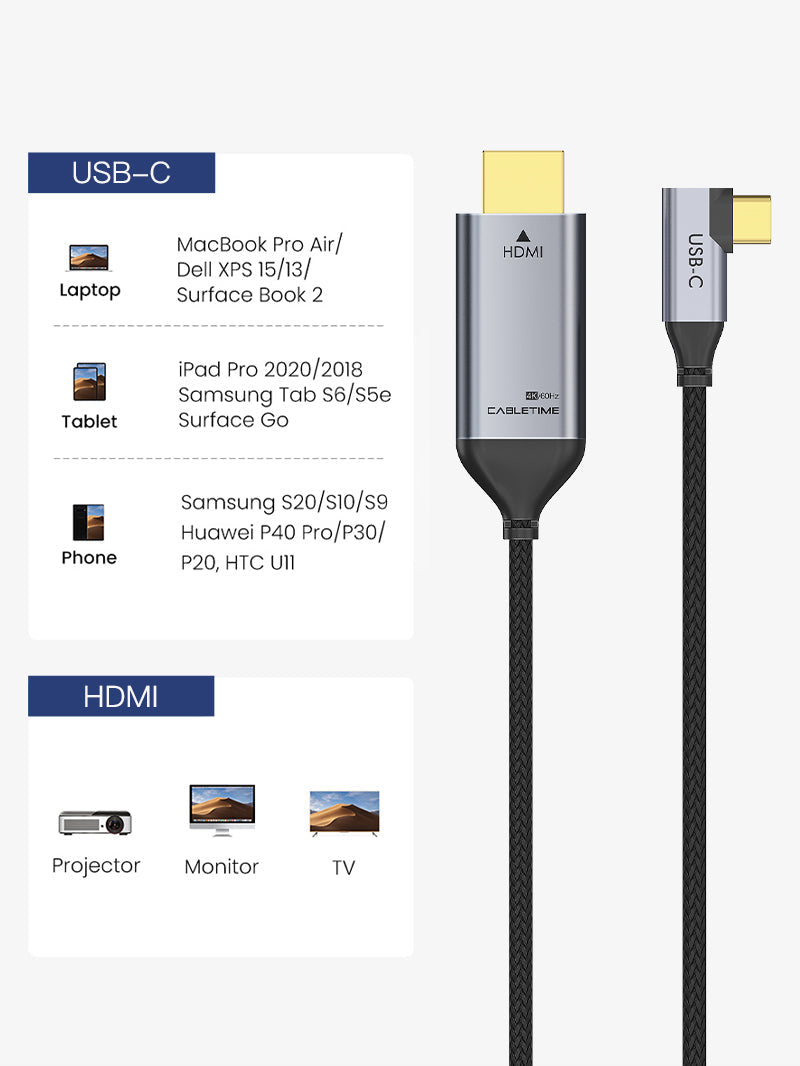
USB-C to HDMI Cable 4K 60Hz Right Angle for MacBook Pro
Connect your USB-C laptop, MacBook, tablet or supported smartphone directly to an HDMI monitor, TV or projector with crisp 4K@60Hz output and a space-saving right-angle USB-C design.
Work, Stream & Game Bigger
Ideal for MacBook Pro, MacBook Air, USB-C laptops, iPad Pro, monitors, TVs, projectors and presentation screens.
UHD ResolutionMale ConnectorCC11KModel Number1.8mBraided Cable Length
Direct USB-C to HDMI Display Connection
The CABLETIME USB-C to HDMI Cable 4K 60Hz Right Angle is designed for users who want a simple direct connection from a USB-C device to an HDMI screen. No separate HDMI cable or bulky adapter is required. Just plug the USB-C side into your compatible source device and connect the HDMI side to your monitor, TV or projector.
Simple Connection Flow
One cable from USB-C to HDMI for work, presentations, movies and gaming.
USB-C Source Device
MacBook, USB-C laptop, tablet or supported smartphone with video output.
Right-Angle USB-C Cable
Space-saving USB-C connector reduces awkward bends in tight setups.
HDMI Display
Monitor, TV, projector, conference display or gaming screen.
4K@60Hz UHD Display
Enjoy sharp and smooth Ultra HD video output on compatible HDMI monitors, TVs and projectors.
90° Right-Angle USB-C Design
Helps reduce cable bending and keeps the cable cleaner around laptops, tablets, gaming setups and tight desk spaces.
Nylon Braided Wire
Durable braided cable design gives a premium feel and helps withstand daily use at home, office and travel.
Gold-Plated Connectors
Gold-plated USB-C and HDMI connectors help provide stable signal transmission and corrosion resistance.

Why Choose CABLETIME CC11K USB-C to HDMI Right Angle Cable?
The CABLETIME CC11K USB-C to HDMI Cable 4K 60Hz Right Angle is designed for users who want a clean, direct display connection from a USB-C laptop, tablet or smartphone to an HDMI display.
It is useful for MacBook Pro, MacBook Air, USB-C laptops, iPad Pro, conference room displays, projectors, gaming monitors, home TVs, office workstations and presentation setups.
With 4K@60Hz resolution, HDMI 2.0 output, right-angle USB-C connector, gold-plated connectors, aluminum shell and nylon braided wire, it is a premium display cable for work, entertainment and gaming.
Designed for Gaming, Streaming & Tight Spaces
Inspired by Cabletime’s global product positioning, this right-angle USB-C to HDMI cable is ideal when a straight cable gets in the way. Use it for gaming, streaming, presentations or workstation setups where cable direction matters.
Better for Gaming Setups
The 90-degree USB-C connector keeps the cable routed neatly while you connect to a large gaming monitor or TV.
Big-Screen Entertainment
Watch movies, videos, sports and streaming content from your USB-C device on an HDMI TV or projector.
Productive Workstation
Extend your laptop display to a second monitor for documents, spreadsheets, coding, design or multitasking.

Mirror Mode & Extend Mode
Use the screen mode that fits your work or entertainment setup.
Mirror Mode
Show the same laptop or tablet screen on a TV, projector or monitor for meetings, movies and teaching.
Extend Mode
Use a second display for multitasking, presentations, browsing, video editing and productivity.
Smooth Visual Output for Work & Play
Use compatible displays and devices to enjoy sharp 4K video or high-refresh lower-resolution output.
4K@60Hz
Great for UHD monitors, TVs, presentations and high-resolution media.
2K High Refresh
Supports selected 2K high-refresh modes where the device and display support them.
1080p High Refresh
Suitable for smooth Full HD display output on compatible monitors.

Compatible Display Setups
Designed for USB-C source devices that support video output and HDMI display devices.
MacBook ProMacBook AirUSB-C LaptopiPad ProMonitorProjectorGaming ScreenBest Used For
MacBook to Monitor
Connect MacBook Pro or MacBook Air to an HDMI monitor for productivity and extended workspace.
Laptop to TV
Stream movies, presentations, photos and videos from a compatible USB-C laptop to an HDMI TV.
Projector Presentations
Use in meeting rooms, classrooms, exhibitions and training sessions with HDMI projectors.
Gaming & Streaming
Right-angle USB-C design is useful when cable routing matters during streaming or gaming setups.

Simple Plug-and-Use Setup
Connect your USB-C device to an HDMI screen without a separate adapter.
Plug USB-C Side
Connect the right-angle USB-C male connector to a compatible USB-C device with video output support.
Connect HDMI Side
Plug the HDMI 2.0 male connector into your HDMI monitor, TV, projector or display input.
Mirror or Extend
Choose mirror mode or extend mode from your device display settings, where supported.
Important Compatibility Note
This cable is USB-C to HDMI only. It is not bidirectional and cannot convert HDMI output from a laptop, console or set-top box into USB-C display input.
Your USB-C source device must support video output, DisplayPort Alt Mode or Thunderbolt video output for HDMI display to work.
4K@60Hz requires a compatible USB-C source device, HDMI display, HDMI input setting and display mode support.
This cable is for video/audio display output only. It does not provide USB data transfer, charging, Ethernet or touchscreen return function.
Product Specifications
| Specification | Details |
|---|---|
| Brand | CABLETIME |
| Product Name | USB-C to HDMI Cable 4K 60Hz Right Angle for MacBook Pro |
| Model | CC11K |
| Length | 1.8m |
| Connector A | Right Angle USB-C Male, Gold-Plated |
| Connector B | HDMI 2.0 Male, Gold-Plated |
| Resolution | 4K@60Hz |
| Additional Supported Modes | 2K@144Hz, 2K@120Hz, 2K@60Hz, 1080p@144Hz with compatible devices and displays |
| Display Modes | Mirror Mode, Extend Mode |
| Material | Aluminum Shell + Nylon Braided Wire |
| Function | USB-C source device to HDMI monitor, TV or projector display cable |
| SKU | CT-C160-PU31-CMRHD1-S1.8 |
Buy from CABLETIME Official Store India
Get genuine CABLETIME products in India with secure checkout, official product availability and customer support.
Genuine ProductOfficial India Store4K@60Hz DisplayCustomer SupportFrequently Asked Questions
What is this cable used for?
It is used to connect a compatible USB-C device to an HDMI monitor, TV or projector for video display output.
What are the connectors?
It has a right-angle USB-C male connector on one side and an HDMI 2.0 male connector on the other side.
What resolution does it support?
The listed resolution is 4K@60Hz. Other supported modes depend on the connected source device and display.
Does it support mirror and extend mode?
Yes, it can support mirror mode and extend mode where the connected device and operating system support those display modes.
Is this cable bidirectional?
No. It is intended for USB-C source to HDMI display output only. It does not convert HDMI output to USB-C display input.
Why is the USB-C connector right angled?
The right-angle design helps reduce cable bending and is useful for tight spaces, gaming setups, desk setups and laptop side ports.
Check the signal path first.
Identify the source and display or capture device, check connector type and conversion direction, then connect and select the correct input. Choose a video mode supported by the complete setup.
Will I always get the maximum listed resolution?
Actual output depends on the source, receiving device, intermediate equipment, selected mode and the length or version you choose. Check any length-specific limits in the product details.
Which length or version should I select?
Use the product selector to choose the required option. Check that option against any model, connector, length or pack-size distinctions in the specifications before ordering.