USB 3.0 to Gigabit Ethernet Adapter 1000Mbps RJ45
The CABLETIME CB50G USB 3.0 to Gigabit Ethernet Adapter adds a stable wired LAN connection to laptops, desktops, mini PCs, gaming devices and USB-A enabled systems. With USB 3.0 input, RJ45 output with LED indicator and support for 10/100/1000Mbps transmission, it is a practical solution for users who want more reliable networking than Wi-Fi for work, streaming, downloads, video calls, gaming and office LAN access.
A Stable Wired Link When Wi-Fi Is Not Enough
Wi-Fi can fluctuate due to walls, distance, interference and congestion. This USB 3.0 Ethernet adapter gives your device a direct RJ45 LAN connection for smoother everyday networking.
Network Workflow
Plug. Connect. Work. Stream. Game.
Use it to connect your laptop, desktop, Nintendo Switch, TV box or USB-A device to a router, switch, wall LAN port or office network.
Key Benefits
01. Gigabit Ethernet Upgrade
Adds a 10/100/1000Mbps RJ45 LAN port to compatible USB-A devices for stable wired network access.
02. USB 3.0 Input
Connects through a USB 3.0 male connector, making it suitable for laptops, desktops, mini PCs and compatible USB-A systems.
03. RJ45 Port with LED
RJ45 female output includes LED indication, helping you check link and activity status more easily during use.
04. Better Stability Than Wi-Fi
Useful for video calls, online meetings, downloads, uploads, streaming, gaming and office network systems where stability matters.
05. Aluminum Shell + ABS Build
The aluminum shell and ABS material combination gives the adapter a clean, practical and durable everyday design.
06. Wide USB-A Compatibility
Designed for many USB-A devices including desktop PCs, laptops, Nintendo Switch, TV boxes and compatible computer systems.

Best Used For
Laptop wired internetDesktop PC LAN accessVideo calls and meetingsNintendo Switch wired LANTV box Ethernet setupStreaming and downloadsOffice LAN connectionGaming over wired networkSmart Visual Guide: How to Use
A simple setup flow for adding a Gigabit RJ45 Ethernet connection to your USB-A device.
Plug AdapterConnect the USB 3.0 male end to your laptop, desktop, TV box, Nintendo Switch dock or compatible USB-A device.
Connect Ethernet CableInsert an RJ45 Ethernet cable into the adapter’s RJ45 female port until it clicks securely.
Connect Network SourceConnect the other end of the Ethernet cable to a router, switch, wall LAN port or office network point.
Check LED StatusUse the LED indicator to confirm connection activity and verify network link status on your device.
Use Wired NetworkUse the stable wired connection for video calls, downloads, uploads, streaming, gaming or office network access.
Network Tip:To achieve Gigabit performance, your router, switch, Ethernet cable, device USB port and network setup must also support Gigabit Ethernet.

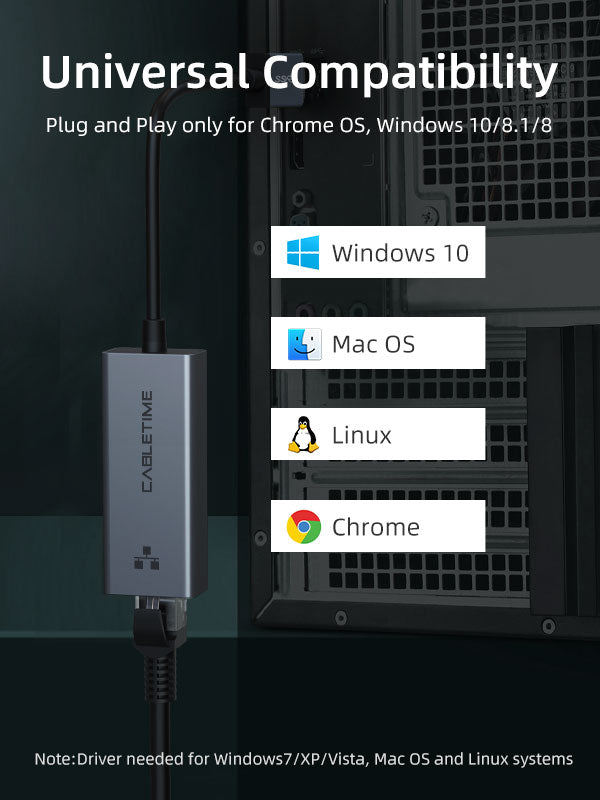
Device & Network Compatibility
Important Speed Note
Actual Ethernet speed depends on your device USB port, router, switch, Ethernet cable, driver support, operating system and internet plan. To achieve 1000Mbps Gigabit performance, the full network chain must support Gigabit Ethernet.
Technical Specifications
| Brand | CABLETIME |
| Product Type | USB 3.0 to Gigabit Ethernet Adapter |
| Model | CB50G |
| SKU | CT-AML1000-AG |
| Input | USB 3.0 Male |
| Output | RJ45 Female with LED |
| Transmission Rate | 10/100/1000Mbps |
| Material | Aluminum Shell + ABS |

Frequently Asked Questions
What is this adapter used for?
It is used to add a wired RJ45 Ethernet port to compatible USB-A devices such as laptops, desktops, TV boxes and gaming devices.
Does it support Gigabit Ethernet?
Yes, it supports 10/100/1000Mbps transmission, depending on your network equipment, cable and device support.
Can I use it with a laptop that has no Ethernet port?
Yes, it is designed to add RJ45 Ethernet connectivity to laptops and desktops through a USB 3.0-A port.
Is this useful for Nintendo Switch?
Yes, the product page lists compatibility with Nintendo Switch and Switch OLED, helping users create a wired LAN gaming setup.
Is wired Ethernet better than Wi-Fi?
Wired Ethernet is usually more stable than Wi-Fi for video calls, streaming, downloads, uploads, gaming and office network access.
What do I need for 1000Mbps speed?
Your adapter, Ethernet cable, router, switch, device USB port and internet/network infrastructure must support Gigabit Ethernet.
Best For
USB 3.0 Ethernet adapter, USB to RJ45 adapter, Gigabit Ethernet adapter, 1000Mbps LAN adapter, USB-A Ethernet adapter, RJ45 network adapter, laptop Ethernet adapter, wired internet adapter, Ethernet adapter for Nintendo Switch, Ethernet adapter for MacBook, Ethernet adapter for Dell XPS, USB LAN adapter, CABLETIME CB50G and CABLETIME CT-AML1000-AG.

Add Stable Gigabit Ethernet to Your USB-A Device
The CABLETIME CB50G USB 3.0 to Gigabit Ethernet Adapter gives laptops, desktops, TV boxes and compatible gaming devices a reliable RJ45 wired network connection.
Plug In. Go Wired. Network Smarter.
Connect. Check the link. Test the route.
Match the connector and cable category to the installation. Seat connections firmly without forcing them, check link indicators where available and test the completed network connection.
Does this determine my internet speed?
Your network equipment, cabling, port capabilities and internet service all affect throughput. The accessory’s advertised maximum is not a guarantee of internet speed.
Which length or version should I select?
Use the product selector to choose the required option. Check that option against any model, connector, length or pack-size distinctions in the specifications before ordering.