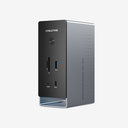

Three Monitor 16-in-1 USB Type-C Docking Station with SSD Enclosure
Connect up to three external displays, high-speed USB devices, wired Ethernet, SD/TF cards, audio accessories and USB-C charging through one powerful desktop docking station.
One-Cable Desk Setup
Ideal for professionals, creators, analysts, traders, designers and multi-screen laptop users.
16-in-1Docking Station3 ScreensTriple Display Support10GbpsUSB-C / USB-A Data100WUSB-C PD Charging
A Complete Desktop Dock for Serious Productivity
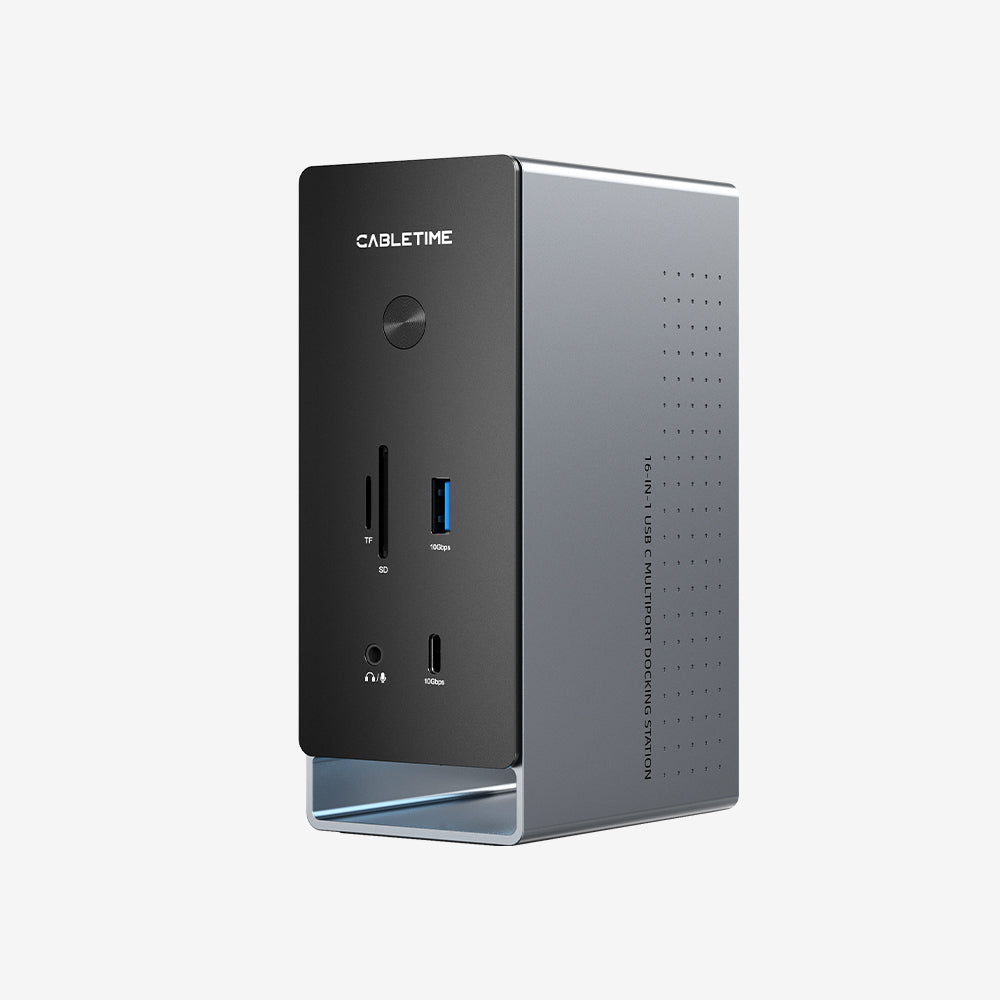
The CABLETIME CB18G 16-in-1 USB-C Docking Station is designed to turn a compatible USB-C laptop into a full workstation. It brings together triple monitor display output, fast USB transfer, card reading, wired internet, audio, charging and SSD expansion support in one vertical aluminium dock.
Triple 4K Display Support
Connect multiple monitors using dual HDMI and DisplayPort for a wider workspace, better multitasking and more efficient professional workflows.
10Gbps USB-C & USB-A
Transfer large files quickly using high-speed USB-C 3.2 and USB-A 3.2 ports rated up to 10Gbps with compatible devices.
Magnetic SSD Expansion
Use the compatible magnetic M.2 SSD enclosure option to expand storage neatly without messy external cables.
1Gbps Ethernet
Get a stable wired network connection for video calls, streaming, cloud uploads, downloads and office work.
Why Choose CABLETIME CB18G?
The CABLETIME Three Monitor 16-in-1 USB Type-C Docking Station is built for users who want a clean and powerful desktop setup from a single USB-C connection. Instead of using separate display adapters, USB hubs, LAN adapters, card readers and charging cables, this dock centralizes everything.
It is especially useful for Windows MST-enabled laptops, where it can extend across up to three external monitors with different content. This is ideal for trading desks, coding, video editing, design work, analytics dashboards, spreadsheets and multi-window office productivity.
The dock also includes 100W USB-C Power Delivery, high-speed 10Gbps USB-C/A data ports, SD/TF 3.0 card readers, 1Gbps Ethernet, 3.5mm audio & mic, and a premium aluminium vertical body with ambient lighting and power button.

Triple Display Productivity
Designed for users who need more screen space, cleaner multitasking and flexible monitor layouts.
HDMI 4K60Hz
Use the primary HDMI output for a high-resolution display setup.
HDMI 4K30Hz
Add a second HDMI display for additional workspace and multitasking.
DisplayPort 4K60Hz
Connect a DisplayPort monitor for a complete three-monitor workstation.
Windows MST & macOS Display Behaviour
On compatible Windows laptops, the dock supports MST for extending up to three monitors with different display content.
On macOS, the product supports mirror mode or extended mirror mode, where external monitors may show the same content depending on Mac model and system support.

16-in-1 Port Layout
HDMI 4K60HzHDMI 4K30HzDP 4K60Hz2 × USB-C 3.2USB-A 3.22 × USB-A 3.02 × USB-A 2.0SD 3.0TF 3.0LAN 1000MbpsUSB-C PD 100WAudio & MicM.2 SSD OptionAmbient LightPower ButtonUSB-C HostBest Used For
Triple-Monitor Workstations
Create a wide productivity setup with HDMI and DisplayPort display outputs.
Trading & Analytics Desks
Use multiple screens for charts, dashboards, browser tabs, spreadsheets and communication tools.
Creators & Editors
Connect displays, SD/TF cards, USB storage, audio accessories and SSD expansion from one dock.
Office & Hybrid Work
Use one dock for laptop charging, displays, wired internet, USB accessories and audio meetings.

Simple Setup Guide
One dock can replace multiple adapters on your desk.
Connect USB-C Host
Connect the dock to your compatible USB-C laptop using the included USB-C Gen2 cable.
Add Monitors
Connect HDMI and DisplayPort monitors for a multi-screen workstation.
Connect Devices
Plug in USB drives, keyboard, mouse, headset, SD/TF cards and Ethernet cable.
Power Through PD
Use a compatible USB-C charger with the PD port for laptop pass-through charging.
Important Compatibility Note
For video output, your USB-C device must support DisplayPort Alt Mode. Triple independent display output requires a compatible Windows MST-enabled laptop.
macOS does not support MST in the same way as Windows, so external displays may mirror or show the same extended content depending on the Mac and system configuration.
Actual display resolution, charging speed, USB speed, Ethernet performance, card reader speed and SSD performance depend on host device, operating system, cable, charger, monitor and connected accessories.

Product Specifications
| Specification | Details |
|---|---|
| Brand | CABLETIME |
| Model | CB18G |
| SKU | CT-DK181-AG |
| Product Type | 16-in-1 USB-C Docking Station with SSD Enclosure Option |
| Host Input | USB-C, MST support on compatible Windows systems |
| HDMI Output 1 | 1 × HDMI, up to 4K60Hz |
| HDMI Output 2 | 1 × HDMI, up to 4K30Hz |
| DisplayPort Output | 1 × DisplayPort, up to 4K60Hz |
| USB-C Data Ports | 2 × USB-C 3.2, up to 10Gbps |
| USB-A 3.2 Port | 1 × USB-A 3.2, up to 10Gbps |
| USB-A 3.0 Ports | 2 × USB-A 3.0, up to 5Gbps |
| USB-A 2.0 Ports | 2 × USB-A 2.0, up to 480Mbps |
| Card Reader | SD 3.0 + TF 3.0, listed up to 104MB/s |
| Ethernet | LAN 1000Mbps |
| Power Delivery | USB-C PD, up to 100W |
| Audio | 3.5mm Audio & Mic Combo Jack |
| SSD Expansion | Compatible with magnetic M.2 SSD enclosure option |
| Design | Vertical dock with ambient lighting and power button |
| Material | Aluminium body / aluminium alloy shell |
| Included Accessory | USB-C Gen2 cable, 1m |
Buy from CABLETIME Official Store India
Get genuine CABLETIME products in India with secure checkout, official product availability and customer support.
Genuine ProductOfficial India StoreSecure CheckoutCustomer SupportFrequently Asked Questions
Does this docking station support three monitors?
Yes, it supports triple display output through two HDMI ports and one DisplayPort on compatible systems.
Can it extend three different screens?
On compatible Windows MST-enabled laptops, it can extend up to three monitors with different display content. macOS display behaviour is more limited and may mirror content.
Does it support SSD expansion?
Yes, it is compatible with a Cabletime magnetic M.2 SSD enclosure option. Please select the correct variant if SSD enclosure is required.
Does it support laptop charging?
Yes, it includes USB-C Power Delivery support up to 100W with a compatible charger, cable and laptop.
Does it have Ethernet?
Yes, it includes a 1Gbps Ethernet port for stable wired internet connectivity.
What is the model number?
The model number is CB18G and the SKU is CT-DK181-AG.
Available options
| Option | SKU |
|---|---|
| Dock Only | CB18G |
| Dock + SSD Enclosure | CB18G+CB33G |
Choose your option using the product selector above. Availability is shown for the selected option.
Connect in a clear sequence.
Check host compatibility, connect any required power supply, attach the host cable and then add peripherals. Configure display, network and audio settings where those functions are provided.
Will every USB-C port support all functions?
No. Port shape alone does not establish video output, charging or data capabilities. Match the host requirements and supported operating-system features listed for this product.
Which length or version should I select?
Use the product selector to choose the required option. Check that option against any model, connector, length or pack-size distinctions in the specifications before ordering.