USB 3.0 VR Link Cable for Meta Quest, 5Gbps, 3A, 3m/5m
Our USB 3.0 VR Link Cable connects compatible Meta Quest/Oculus and Pico headsets to a gaming PC through USB-A 3.0 and right-angle USB-C. It combines up to 5Gbps data, host-powered charging support and 3m or 5m reach for practical seated or room-scale play.
Designed for wired PC VR
Connect the USB-A end directly to a suitable high-speed USB port on your gaming PC and the right-angle USB-C end to the headset. The right-angle connector sits closer to the headset body, helping reduce protrusion and cable movement during active play.
High-speed game data
USB 3.0 bandwidth up to 5Gbps supports the continuous data path needed by compatible wired PC VR software and high-resolution VR streaming.
Charge while connected
The cable supports up to 3A charging from a capable USB host port. This can slow battery drain, although charging performance varies by PC port and headset workload.
Room-friendly movement
Choose 3m for closer desk and seated setups or 5m for a larger play area and greater freedom to turn and move.
Durable gaming construction
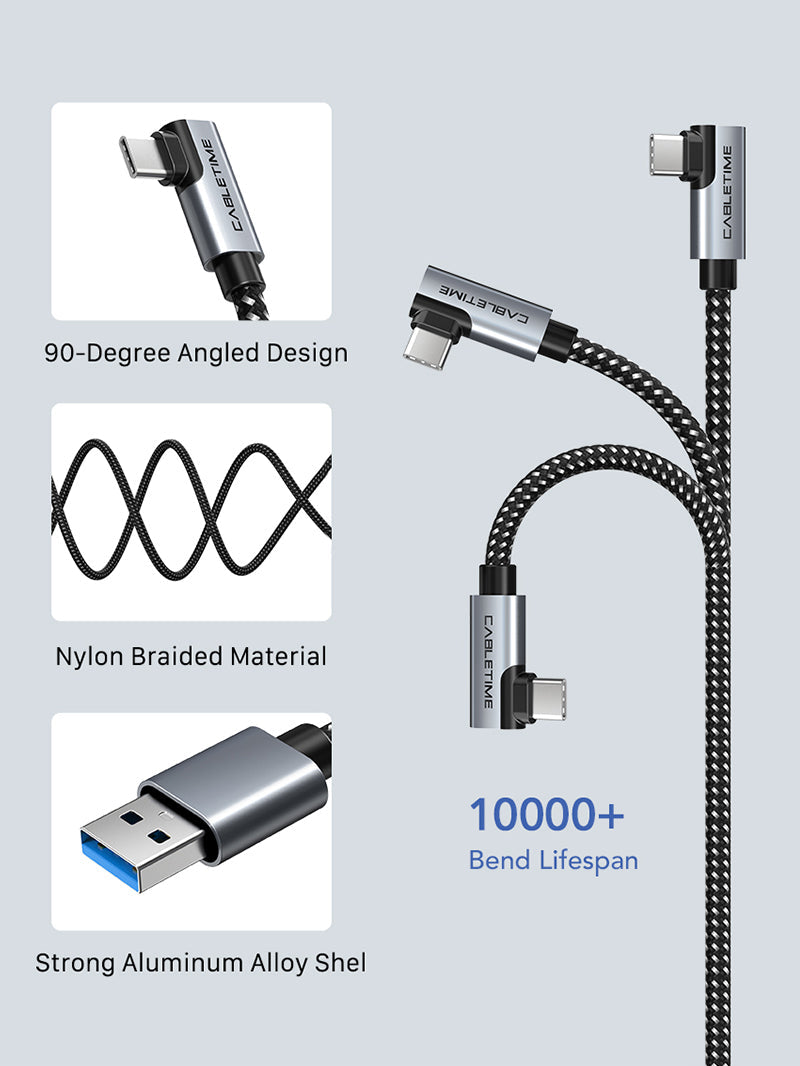
An aluminium connector shell, nylon-braided cable and right-angle headset end improve everyday handling and help resist repeated bending.

Connection direction
PC side: USB-A 3.0 male. Headset side: right-angle USB-C male. Connect directly to a suitable high-speed USB port on the gaming PC and avoid low-speed hubs when troubleshooting performance.


Set up in four simple steps
1. Check the PC
Confirm that the computer meets the headset's PC VR requirements and has a working USB 3.x Type-A port.
2. Install the VR software
Install and update the headset application and the VR platform you plan to use.
3. Connect securely
Insert USB-A into the PC and the right-angle USB-C plug into the headset. Route the cable safely around the play area.
4. Test the connection
Use the headset software's cable or USB test where available. If it reports USB 2.0, try another high-speed motherboard port.


Please check before buying
- This is a wired USB-A-to-USB-C VR data cable; your PC must have a suitable USB-A 3.x port.
- A 5Gbps-rated cable does not make an incompatible or underpowered computer VR-ready.
- Host-port charging may not fully offset headset consumption during demanding gameplay.
- Actual performance depends on the PC USB controller, port, software, headset and system load.
- Secure loose cable length to reduce trip risk during room-scale play.
Complete specification sheet
| Specification | Details |
|---|---|
| Brand | CABLETIME |
| Product type | USB 3.0 PC VR link cable |
| PC connector | USB-A male 3.0 |
| Headset connector | Right-angle USB-C male |
| Maximum data rate | Up to 5Gbps |
| Charging support | Up to 3A, dependent on host USB port |
| Material | Aluminium shell and nylon-braided cable |
| Models / lengths | CA43N — 3m; CA43P — 5m |
| SKUs | CT-VRC-AG3; CT-VRC-AG5 |
| Typical compatibility | Compatible Meta Quest/Oculus and Pico headsets used with supported PC VR software |
| Warranty | 2-year CABLETIME warranty |
Frequently asked questions
Does it work with Meta Quest 3 and Quest 2?
It is designed for compatible USB-C Meta Quest/Oculus headsets used with a supported gaming PC and link software.
Is it a charging-only cable?
No. Its primary purpose is high-speed USB 3.0 data for wired PC VR, with charging support from the host port.
Which length should I choose?
Choose 3m for seated or close-range play and 5m for a larger room-scale play area.
Why might software report USB 2.0?
The cable may be connected to a USB 2.0 port or hub, or the PC's USB controller or driver may be limiting the connection.
Will the headset battery stay at 100%?
Not necessarily. The PC port's power output and the headset's active power use determine whether the battery charges, holds level or drains slowly.
Can I use a USB extension?
Extensions can reduce signal quality. For best results, connect this cable directly wherever possible.
See the VR Link Cable in detail

CABLETIME India
Shop directly with CABLETIME India • GST invoice • India-based support • Clearly identified model and SKU • 2-year CABLETIME warranty
Available options
| Option | SKU |
|---|---|
| 3m | CA43N |
| 5m | CA43P |
Choose your option using the product selector above. Availability is shown for the selected option.
Match the ports. Choose the right version.
Check connector types, cable length and the supported functions before connecting. Insert plugs without forcing them and leave enough slack around device ports.
Will it support every function of my device?
Only the functions listed for this product should be expected. Charging, data and display capability depend on the accessory and both connected devices; check the product details for your intended use.
Which length or version should I select?
Use the product selector to choose the required option. Check that option against any model, connector, length or pack-size distinctions in the specifications before ordering.