CABLETIME Bi-Directional 4K 60Hz HDMI 2.0 Switch 1 in 2 Out / 2 in 1 Out Manual HDMI Switcher
Rs. 1,060.00
Couldn't load pickup availability
Want next day delivery? Be quick!
Shop safely
Secure your shopping experience with various safe and trusted payment methods.
The 4k 60hz HDMI switch allow you built 2 input signals to one display, use one button to switch input content without delay, greatly increasing your productivity your productivity.4k 60Hz HD resolution gives you a visual feast on the big screen.

Bi-Directional HDMI Switch
This HDMI splitter has two modes: 1 in 2 out or 2 in 1 out. 1 in 2 out means connecting two HDMI signals input to your 1 TV, monitor or projector, 2 in 1 out means connecting one HDMI signal input to switch between two displays (only one monitor will display).

4K@60Hz HD Resolution
This HDMI 2.0 switcher support 4K@60Hz, 2K@60Hz, 1080P@120Hz, 3D HD resolution.so you can enjoy vivid video and audio

Fast and stable transfer speed
HDMI switch delivers high bandwidth 18Gbps data transmission, and built-in advanced chipset enable stable performance.There is no lag, no loss of image or sound quality.
CABLETIME CP30G | Bi-Directional HDMI Switch | SKU CT-HS4K-2G
CABLETIME Bi-Directional 4K 60Hz HDMI 2.0 Switch 1 in 2 Out / 2 in 1
Switch between two HDMI source devices on one display, or connect one HDMI source to two displays and manually choose which display is active. This compact CABLETIME bi-directional HDMI switch supports up to 4K@60Hz, 2K@60Hz, 1080P@120Hz, 3D video, 18Gbps high-speed transmission, manual button switching and plug-and-play operation.
Switch HDMI Without Cable Swapping
Use one compact HDMI switch for two-source switching or selectable dual-display output.
Ultra HD Resolution
High-Speed Transfer
1x2 or 2x1 Switching
Model Number
Compact HDMI Switch for Gaming, Work, Streaming & Home Entertainment
The CABLETIME Bi-Directional 4K 60Hz HDMI Switch is designed for users who want to avoid repeated HDMI cable plugging and unplugging. Use it to connect two HDMI devices such as a gaming console, laptop, PC, media player or set-top box to one TV or monitor. You can also use it in reverse to connect one HDMI source to two displays and manually select which display is active.
How It Works
Use it in 2-in-1-out mode for two sources to one display, or 1-in-2-out mode for one source to one active display at a time.
2 In 1 Out Mode
Connect two HDMI sources to one TV, monitor or projector and switch between them with the manual button.
1 In 2 Out Mode
Connect one HDMI source to two displays and manually select which one display is active at a time.
Manual Button Control
Press the switch button to change the active HDMI source or active HDMI display without unplugging cables.
Important Bi-Directional Usage Note
This HDMI switch can be used as 2 inputs to 1 output, or 1 input to 2 outputs. However, in 1-in-2-out mode, only one connected display can be active at a time.
It is not a true HDMI splitter for showing the same source on two displays simultaneously. It is a manual switch, not an automatic switch.
Manual Switch, One Active Output
Best for cable-saving setups where you need to choose between HDMI devices or displays.
Two Flexible Connection Modes
One compact switch for two different HDMI connection needs.
Switch Two Sources
Connect a console and laptop to one HDMI display, then select which device appears on screen.
Switch Two Displays
Connect one HDMI source to two displays and select whether Display 1 or Display 2 is active.
Made for Gaming, Workstations & Entertainment Setups
A portable HDMI switch for simple, clean and flexible display switching.
Gaming Consoles
Switch between PS5, PS4, Xbox, Nintendo Switch or gaming devices on one display.
Laptop & PC Setups
Share one monitor between a work laptop and desktop PC, or switch one laptop between two displays.
Streaming & Media Devices
Use with media players, set-top boxes, Blu-ray players, TV boxes and streaming devices.
Portable AV Use
Compact body makes it easy to carry for temporary setups, demos, meetings and travel use.
Key Features
Built for smooth HDMI switching, sharp 4K video and simple plug-and-play use.
Bi-Directional Switching
Use it as 2 HDMI inputs to 1 HDMI output, or 1 HDMI input to 2 selectable HDMI outputs.
4K@60Hz Ultra HD
Supports clear 4K@60Hz output when the source, display and HDMI cables support the same performance level.
2K60 + 1080P120 + 3D
Also supports 2K@60Hz, 1080P@120Hz and 3D HD resolution as listed by CABLETIME.
18Gbps Transmission
High-bandwidth transmission supports stable video and audio performance with compatible HDMI cables.
Manual One-Button Switching
Switch between HDMI devices or displays using one physical button, with no software or driver setup.
Aluminum Shell + ABS
Durable construction helps with heat dissipation while keeping the switch compact and desk-friendly.
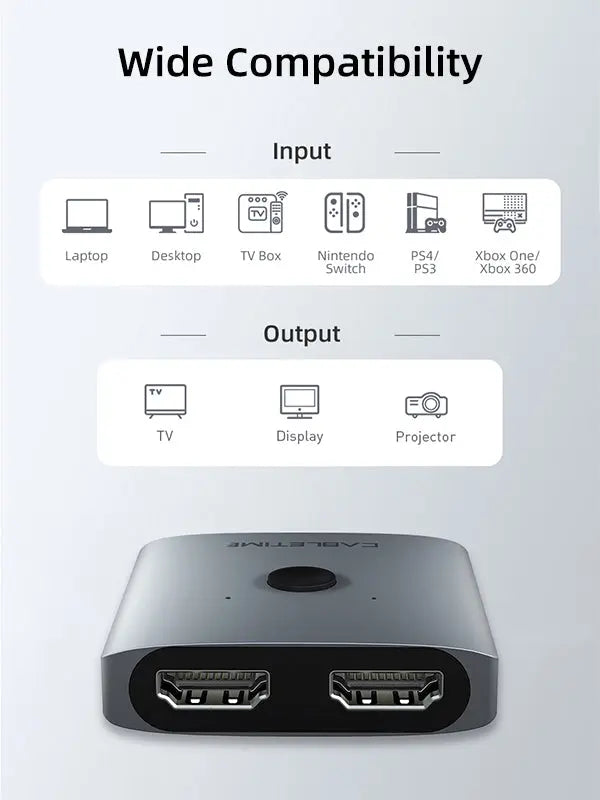
Compatible HDMI Devices
Works with standard HDMI-enabled source devices and displays where the source, cable and display support the selected resolution.
PS5 / PS4
Xbox
Nintendo Switch
Laptop
PC
TV Box
Blu-ray Player
Projector
What This Product Does
- Switches between two HDMI source devices on one HDMI display.
- Can also switch one HDMI source between two HDMI displays, with one display active at a time.
- Supports up to 4K@60Hz resolution.
- Supports 2K@60Hz, 1080P@120Hz and 3D HD video as listed by CABLETIME.
- Supports 18Gbps high-speed HDMI transmission.
- Uses a manual button for quick input or output selection.
- Plug-and-play design requires no driver or software installation.
- Compact aluminum shell + ABS body is suitable for gaming desks, workstations, TV cabinets and travel setups.
- Useful for consoles, laptops, PCs, TV boxes, Blu-ray players, projectors, monitors and TVs.
Please Check Before Buying
- This is a manual HDMI switch, not an automatic switch.
- In 1-input / 2-output mode, only one display works at a time.
- It does not mirror one source to two displays simultaneously like a true HDMI splitter.
- For 4K@60Hz, the HDMI source, display and cable must all support 4K60Hz.
- Use good-quality HDMI cables for stable 4K60Hz performance.
- The current preview page’s spec table shows HDMI Version 1.4, while the title and feature copy show HDMI 2.0 / 18Gbps. Confirm or correct this before final publishing.
- HDMI cable and other accessories should be checked separately as per product package contents.
Specification Sheet
Complete technical details for model, SKU, modes, resolution, transmission, material and usage notes.
| Specification | Details |
|---|---|
| Brand | CABLETIME |
| Product Name | Bi-Directional 4K 60Hz HDMI 2.0 Switch 1 in 2 Out 2 in 1 |
| Model | CP30G |
| SKU | CT-HS4K-2G |
| Product Type | Bi-directional manual HDMI switch |
| Mode 1 | 2 HDMI sources to 1 HDMI display |
| Mode 2 | 1 HDMI source to 2 selectable HDMI displays, with only one display active at a time |
| Input / Output Ports | 2 HDMI ports on one side and 1 HDMI port on the other side, depending on selected direction |
| Switching Method | Manual button switching |
| Maximum Resolution | 4K@60Hz |
| Additional Resolution Support | 2K@60Hz, 1080P@120Hz and 3D HD as listed by CABLETIME |
| Transmission Bandwidth | 18Gbps as listed in the product feature copy |
| HDMI Version Note | Product title and features position this as HDMI 2.0; current preview specs show HDMI Version 1.4 and should be verified before publishing |
| Driver Requirement | Plug-and-play, no external drivers required |
| Material | Aluminum Shell + ABS |
| Compatible Source Examples | PS5, PS4, Xbox, Nintendo Switch, laptop, PC, TV box, Blu-ray player, media player and other HDMI source devices |
| Compatible Display Examples | TVs, monitors, projectors and HDMI displays |
| Primary Use | Manual switching between HDMI devices or selectable HDMI displays for gaming, workstations, entertainment and portable AV setups |
Frequently Asked Questions
Clear answers help customers understand bi-directional usage, resolution support, switching method and correct setup.
What is this product used for?
It is used to manually switch between two HDMI source devices on one display, or to switch one HDMI source between two displays with one display active at a time.
Is this a true HDMI splitter?
No. In 1-in-2-out mode, only one display can be active at a time. It does not show the same source on two displays simultaneously.
Is the switching automatic?
No. This is a manual HDMI switch. Press the button to switch between connected HDMI sources or displays.
What is the maximum resolution?
It supports up to 4K@60Hz when the HDMI source, display and cable all support 4K60Hz.
Does it support 1080P high refresh?
Yes, CABLETIME lists support for 1080P@120Hz in compatible setups.
Does it support 3D video?
Yes, the product page lists 3D HD resolution support. Your source, content, HDMI cable and display must also support 3D playback.
Does it need drivers?
No. It is plug-and-play and does not require external drivers or software installation.
Can I use it with PS5, Xbox or Nintendo Switch?
Yes, it can be used with HDMI gaming consoles and other HDMI devices where the source and display support the selected resolution.
Can it connect one laptop to two displays at the same time?
No. It can connect one HDMI source to two displays, but only one display will be active at a time. It does not duplicate the image to both displays simultaneously.
Does it support 18Gbps transmission?
Yes, the product feature copy lists 18Gbps high-bandwidth transmission for stable video and audio in compatible setups.
Does it require external power?
The official product feature positioning says plug and play with no external drivers. Power behaviour may depend on the connected HDMI devices, so use the product package instructions if any power accessory is supplied.
What data should be verified before publishing?
The title and feature copy say HDMI 2.0 / 18Gbps, while the current preview specs table shows HDMI Version 1.4. Confirm this with the supplier and correct the specification before final publishing.
Buy from CABLETIME Official Store India
Choose genuine CABLETIME products in India with secure checkout, official availability and local customer support.
Dimensions
Dimensions
Include tab content here to detail the dimensions of your product, specifying its height, width, depth, and weight. For example, if you're describing a laptop or monitor, include screen size, thickness, and weight. For smaller devices like smartphones or smartwatches, list exact measurements and note how they affect portability or comfort during use. Mention any adjustable or modular elements—like rotating stands, extendable mounts, or removable bands—that offer added flexibility or customization. This helps customers understand how the product fits into their setup or lifestyle.

Shopping Safely
At our Shopify store, we prioritize your safety and security. Here's how we ensure a secure shopping experience:
1. Secure Transactions: We use advanced encryption to protect your personal and payment information, ensuring it is safely transmitted and safeguarded.
2. Trusted Payment Gateways: Our store integrates with trusted payment gateways, ensuring your transactions are processed securely and efficiently.
3. Data Privacy: Your privacy is our top priority. We follow strict data protection policies to keep your personal information confidential and secure.
4. Secure Platform: Shopify provides robust security features and continuous monitoring against vulnerabilities, ensuring a safe shopping environment.
5. Verified Merchants: We are a verified merchant on Shopify, committed to providing authentic and high-quality products.
6. Transparent Policies: Our clear return, refund, and shipping policies provide peace of mind, knowing we stand behind our products.
7. Customer Support: Our dedicated customer support team is ready to assist with any concerns or questions you may have.
Shop confidently at our Shopify store, where your safety and satisfaction are our top priorities.
Rs. 1,060.00
Bulk order
Questions about this product?
Don't be a stranger.
Selling fast!
Get yours while you can.